> ## Documentation Index
> Fetch the complete documentation index at: https://docs.capx.ai/llms.txt
> Use this file to discover all available pages before exploring further.
# Mainnet Registration Guide
Operators on Mainnet are essential to the functioning of the actual decentralized AI infrastructure and are compensated accordingly.
## Key considerations for Mainnet registration:
* Full stake requirement must be met
* Production-grade hardware is necessary
* Higher uptime and reliability expectations
* Real economic incentives and rewards
* Participation in network consensus
* Reputation building within the ecosystem
Mainnet operators who consistently maintain high-quality service become eligible for additional incentives and may receive priority for new feature testing.
## Mainnet Registration Steps
### `Capx Cloud` Network Dashboard- [here](https://app.symbiotic.fi/network/0xAD12e74847d6D1487A6a3A6b75D1f509f3F627e8).
Capx Cloud is using [Othentic](https://www.othentic.xyz/) stack to host it’s AVS network with Symbiotic.
### **Install the Othentic CLI**
1. Make sure you are running Node version 22.6 and not the latest. The latest node version has issues that are widely know and will cause issues with the running of the othentic-cli
2. othentic-cli should not be run inside the folder that has the .env file. If you do, it will throw errors.
Installing Othentic CLI with `npm`:
```
npm i -g @othentic/othentic-cli
```
Verify installation by the command:
```
othentic-cli -v
```
The outcome should be similar to (version can be higher than the below):
```
othentic-cli version 1.3.0
```
CLI installation is completed.
### Configure ENV Variables
Configure the below env variables :
```jsx theme={null}
L1_RPC=https://eth-mainnet.g.alchemy.com/v2/cfbG2jJdddQ1A64OaB3C0uV60A9qM_KD
L2_RPC=https://arb-mainnet.g.alchemy.com/v2/cfbG2jJdddQ1A64OaB3C0uV60A9qM_KD
L1_CHAIN=1
L2_CHAIN=42161
```
These environment variables are used to configure the network:
* **L1\_RPC**: The RPC endpoint URL for the `Ethereum` network
* **L2\_RPC**: The RPC endpoint URL for the `Arbitrum` network
* **L1\_CHAIN**: The chain identifier for the `Ethereum` network
* **L2\_CHAIN**: The chain identifier for the `Arbitrum` network
These variables need to be properly configured before proceeding with the operator registration process.
### Register as an Operator
The Othentic CLI allows you to easily register your Operators.
Capx Cloud Network address - `0x476Ceb36F6f250297Bb59d45f00bdB053445E9CB`
Then, run the following command:
```
othentic-cli operator register --l1-chain mainnet
```
This will start up the process of registering as an Operator on both Symbiotic and your Othentic AVS.
1. **Controller** key:
* Used to sign up with the shared security protocol.
* Represents the account to which restakers delegate their staked assets.
2. **Consensus** key:
* Used by the operator to sign the consensus messages.
`Enter your private key: `
`AVS Governance address - 0xAD12e74847d6D1487A6a3A6b75D1f509f3F627e8`
`Rewards Receiver address (default: msg.sender): `
`Choose shared security provider(s) - `
Example :
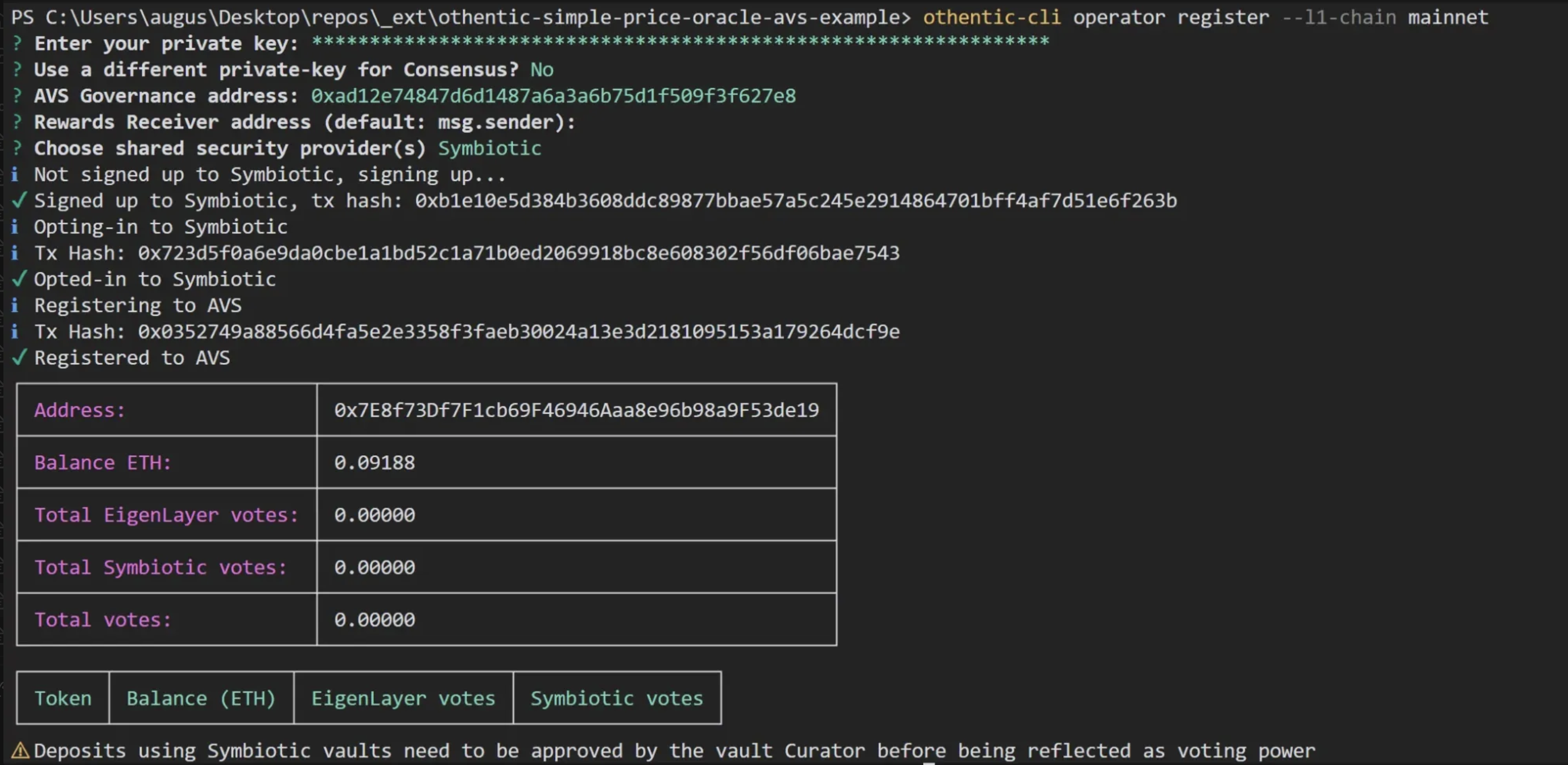 If you *Choose to use a different private-key for Consensus :*
 You are now registered and ready to operate.
Please contact `Capx Cloud` team in-case you need any additional assistance in registrations.
### Verify Registration
* `NETWORK_ADDRESS` - address of the `Capx Cloud` network.
* `OPERATOR_ADDRESS` - an address of the operator to check an opt-in status of
#### Using Etherscan to check:
* [Open “Read Contract” tab in OperatorNetworkOptInService contract](https://etherscan.io/address/0x7133415b33B438843D581013f98A08704316633c#readContract)
* Open `isOptedIn` method
You are now registered and ready to operate.
Please contact `Capx Cloud` team in-case you need any additional assistance in registrations.
### Verify Registration
* `NETWORK_ADDRESS` - address of the `Capx Cloud` network.
* `OPERATOR_ADDRESS` - an address of the operator to check an opt-in status of
#### Using Etherscan to check:
* [Open “Read Contract” tab in OperatorNetworkOptInService contract](https://etherscan.io/address/0x7133415b33B438843D581013f98A08704316633c#readContract)
* Open `isOptedIn` method
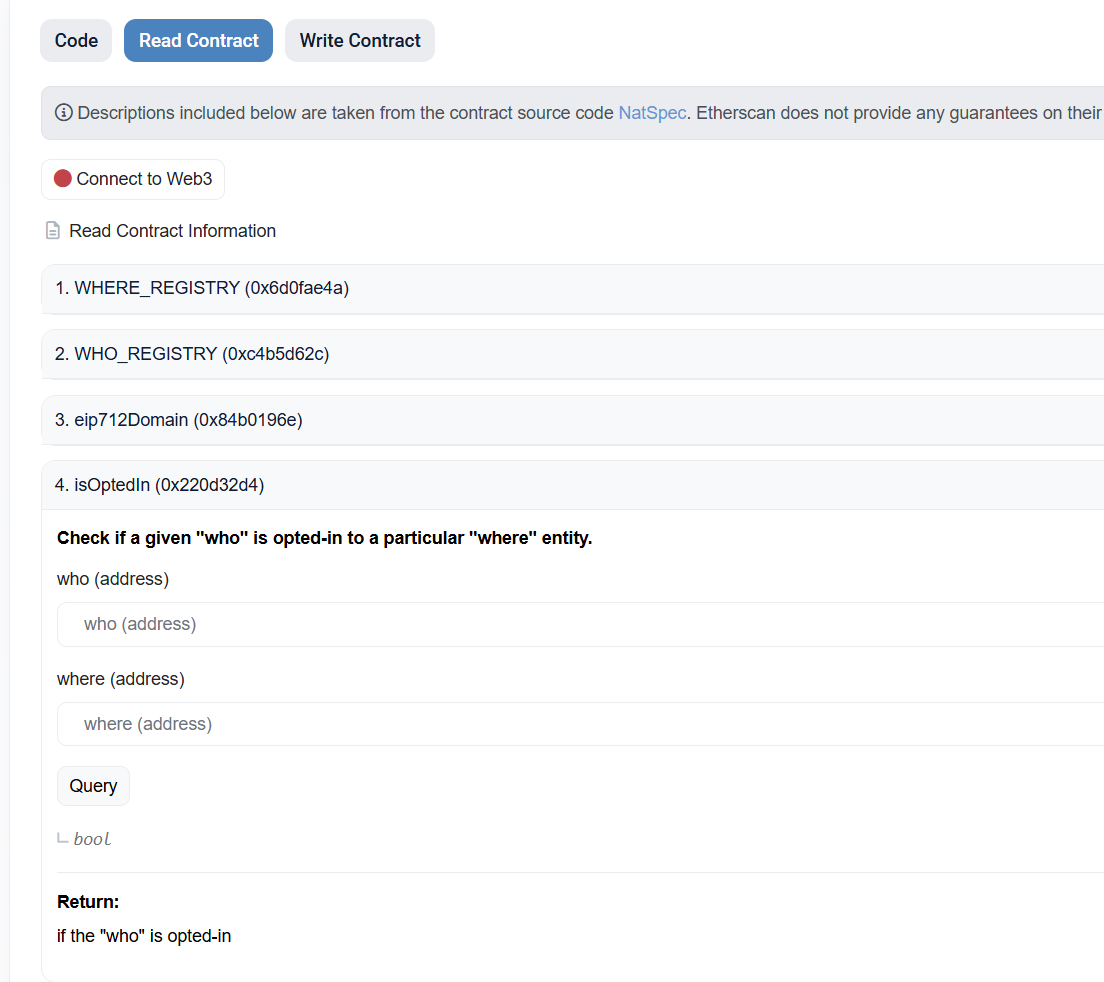 * Put `OPERATOR_ADDRESS` in `who` parameter, `NETWORK_ADDRESS` in `where`, and click “Query”
* It should return `true`
### 1. Register to Symbiotic
Capx Cloud Network address - `0x476Ceb36F6f250297Bb59d45f00bdB053445E9CB`
#### Using [Safe](https://app.safe.global/):
* Open “Transaction builder”
* Put `0x7133415b33B438843D581013f98A08704316633c` as contract address
* Choose `optIn` method
* Input the `Capx Cloud` network’s address
* Sign & send transaction
#### Using [CLI](https://github.com/symbioticfi/cli):
* `NETWORK_ADDRESS` - address of the `Capx Cloud` network.
See [https://docs.symbiotic.fi/guides/cli/#opt-in-network](https://docs.symbiotic.fi/guides/cli/#opt-in-network)
#### Using [CLI](https://github.com/symbioticfi/cli) to check:
* `NETWORK_ADDRESS` - address of the `Capx Cloud` network.
* `OPERATOR_ADDRESS` - an address of the operator to check an opt-in status of
See [https://docs.symbiotic.fi/guides/cli#check-opt-in-network](https://docs.symbiotic.fi/guides/cli#check-opt-in-network)
### 2. Register as Operator - AVS
Official Othentic Guide - [here](https://github.com/Othentic-Labs/othentic-eip1271-operator-registration-script/tree/main)
#### **Prerequisites:**
* **Node.js v22.6:** Ensure Node.js is installed, preferably managed via Node Version Manager (NVM).
* **OpenSSL:** Required for cryptographic operations.
* **Gnosis Safe Address:** The address of your deployed Gnosis Safe on the Ethereum network.
* **BLS Private Key:** A private key associated with the Boneh–Lynn–Shacham (BLS) signature scheme, used for generating authentication signatures.
* **AVS Governance Address:** The address of the Attestation Verification System (AVS) governance contract.
* **Ethereum RPC URL:** An RPC endpoint URL for interacting with the Ethereum network.
#### **Step-by-Step Guide:**
1. **Clone the Repository:**
Begin by cloning the Othentic EIP-1271 Operator Registration Script repository and navigating into its directory
```bash theme={null}
git clone https://github.com/Othentic-Labs/othentic-eip1271-operator-registration-script.git
cd othentic-eip1271-operator-registration-script
```
2. **Install Dependencies:**
Install the necessary Node.js packages:
```bash theme={null}
npm install
```
3. **Generate AVS BLS Public Key & Authentication Signature:**
This script generates an authentication signature to register your Gnosis Safe as an operator in the AVS. Importantly, this process does not require exposing your private keys.
```bash theme={null}
ts-node scripts/genAvsRegisterBlsSignature.ts
```
Parameters :
* ``: Your BLS private key.
* ``: The AVS governance contract address.
* ``: Your Gnosis Safe address.
* ``: The Ethereum network RPC URL.
Example :
```bash theme={null}
ts-node scripts/genAvsRegisterBlsSignature.ts 0x1aa4829bdf0461d6fc1d9cfb0de78eec4b142fc722112fd0369c407d03ad3adb 0x8B8136fB6A8ea7AbA61d88da5753D8fEa2d7d5b2 0xYourGnosisSafeAddress https://mainnet.infura.io/v3/your-infura-project-id
```
This command will produce a JSON file containing your operator information, BLS public key, and the authentication signature. The file is saved as `.othentic/othentic-avs-register-as-operator.json`.
4. **Register as an Operator :**
To register your EIP-1271 wallet as an operator within the Othentic framework, follow these detailed steps:
EIP-1271 Wallet - `Gnosis Safe`
**1. Access the Safe Interface:**
* Navigate to the [Safe web interface](https://app.safe.global/) and select your multisig wallet.
**2. Initiate a Contract Interaction:**
* Click on "New Transaction" and choose "Contract Interaction."
**3. Input Contract Details**
* **Contract Address:** Enter the address (`0xAD12e74847d6D1487A6a3A6b75D1f509f3F627e8`) of the contract containing the `registerAsOperator` function.
* **ABI:** If the contract's ABI isn't already available, add it to enable function selection.
**4. Select the Function:**
* From the list of functions, select `registerAsOperator`.
**5. Prepare Function Parameters:**
* The `registerAsOperator` function accepts a single parameter of type `OperatorRegistrationParams`, defined as:
```solidity theme={null}
struct OperatorRegistrationParams {
uint256[4] blsKey;
address rewardsReceiver;
BLSAuthLibrary.Signature blsRegistrationSignature;
bytes authToken;
}
```
* **Parameter Breakdown:**
* `blsKey`: Extract the four `uint256` values from your JSON file and arrange them in an array.
* `rewardsReceiver`: Specify the address that will receive rewards. This can be your Gnosis Safe address or another designated address.
* `blsRegistrationSignature`: Extract the two `uint256` values from your JSON file and structure them accordingly.
* `authToken`: A `bytes` value; (Not required) this can be an empty byte sequence (`0x`).
* **Input Format:**
* For the `blsKey`, input the array as comma-separated values within square brackets, e.g., `[value1, value2, value3, value4]`.
* For the `blsRegistrationSignature`, input the `signature` array similarly, e.g., `[sigPart1, sigPart2]`.
* Ensure all addresses are in checksum format and all numeric values are in decimal form.
**6. Execute the Transaction:**
* After entering all parameters correctly, proceed to submit the transaction.
* The Safe will require the necessary number of confirmations from the designated signers to execute the transaction.
* Put `OPERATOR_ADDRESS` in `who` parameter, `NETWORK_ADDRESS` in `where`, and click “Query”
* It should return `true`
### 1. Register to Symbiotic
Capx Cloud Network address - `0x476Ceb36F6f250297Bb59d45f00bdB053445E9CB`
#### Using [Safe](https://app.safe.global/):
* Open “Transaction builder”
* Put `0x7133415b33B438843D581013f98A08704316633c` as contract address
* Choose `optIn` method
* Input the `Capx Cloud` network’s address
* Sign & send transaction
#### Using [CLI](https://github.com/symbioticfi/cli):
* `NETWORK_ADDRESS` - address of the `Capx Cloud` network.
See [https://docs.symbiotic.fi/guides/cli/#opt-in-network](https://docs.symbiotic.fi/guides/cli/#opt-in-network)
#### Using [CLI](https://github.com/symbioticfi/cli) to check:
* `NETWORK_ADDRESS` - address of the `Capx Cloud` network.
* `OPERATOR_ADDRESS` - an address of the operator to check an opt-in status of
See [https://docs.symbiotic.fi/guides/cli#check-opt-in-network](https://docs.symbiotic.fi/guides/cli#check-opt-in-network)
### 2. Register as Operator - AVS
Official Othentic Guide - [here](https://github.com/Othentic-Labs/othentic-eip1271-operator-registration-script/tree/main)
#### **Prerequisites:**
* **Node.js v22.6:** Ensure Node.js is installed, preferably managed via Node Version Manager (NVM).
* **OpenSSL:** Required for cryptographic operations.
* **Gnosis Safe Address:** The address of your deployed Gnosis Safe on the Ethereum network.
* **BLS Private Key:** A private key associated with the Boneh–Lynn–Shacham (BLS) signature scheme, used for generating authentication signatures.
* **AVS Governance Address:** The address of the Attestation Verification System (AVS) governance contract.
* **Ethereum RPC URL:** An RPC endpoint URL for interacting with the Ethereum network.
#### **Step-by-Step Guide:**
1. **Clone the Repository:**
Begin by cloning the Othentic EIP-1271 Operator Registration Script repository and navigating into its directory
```bash theme={null}
git clone https://github.com/Othentic-Labs/othentic-eip1271-operator-registration-script.git
cd othentic-eip1271-operator-registration-script
```
2. **Install Dependencies:**
Install the necessary Node.js packages:
```bash theme={null}
npm install
```
3. **Generate AVS BLS Public Key & Authentication Signature:**
This script generates an authentication signature to register your Gnosis Safe as an operator in the AVS. Importantly, this process does not require exposing your private keys.
```bash theme={null}
ts-node scripts/genAvsRegisterBlsSignature.ts
```
Parameters :
* ``: Your BLS private key.
* ``: The AVS governance contract address.
* ``: Your Gnosis Safe address.
* ``: The Ethereum network RPC URL.
Example :
```bash theme={null}
ts-node scripts/genAvsRegisterBlsSignature.ts 0x1aa4829bdf0461d6fc1d9cfb0de78eec4b142fc722112fd0369c407d03ad3adb 0x8B8136fB6A8ea7AbA61d88da5753D8fEa2d7d5b2 0xYourGnosisSafeAddress https://mainnet.infura.io/v3/your-infura-project-id
```
This command will produce a JSON file containing your operator information, BLS public key, and the authentication signature. The file is saved as `.othentic/othentic-avs-register-as-operator.json`.
4. **Register as an Operator :**
To register your EIP-1271 wallet as an operator within the Othentic framework, follow these detailed steps:
EIP-1271 Wallet - `Gnosis Safe`
**1. Access the Safe Interface:**
* Navigate to the [Safe web interface](https://app.safe.global/) and select your multisig wallet.
**2. Initiate a Contract Interaction:**
* Click on "New Transaction" and choose "Contract Interaction."
**3. Input Contract Details**
* **Contract Address:** Enter the address (`0xAD12e74847d6D1487A6a3A6b75D1f509f3F627e8`) of the contract containing the `registerAsOperator` function.
* **ABI:** If the contract's ABI isn't already available, add it to enable function selection.
**4. Select the Function:**
* From the list of functions, select `registerAsOperator`.
**5. Prepare Function Parameters:**
* The `registerAsOperator` function accepts a single parameter of type `OperatorRegistrationParams`, defined as:
```solidity theme={null}
struct OperatorRegistrationParams {
uint256[4] blsKey;
address rewardsReceiver;
BLSAuthLibrary.Signature blsRegistrationSignature;
bytes authToken;
}
```
* **Parameter Breakdown:**
* `blsKey`: Extract the four `uint256` values from your JSON file and arrange them in an array.
* `rewardsReceiver`: Specify the address that will receive rewards. This can be your Gnosis Safe address or another designated address.
* `blsRegistrationSignature`: Extract the two `uint256` values from your JSON file and structure them accordingly.
* `authToken`: A `bytes` value; (Not required) this can be an empty byte sequence (`0x`).
* **Input Format:**
* For the `blsKey`, input the array as comma-separated values within square brackets, e.g., `[value1, value2, value3, value4]`.
* For the `blsRegistrationSignature`, input the `signature` array similarly, e.g., `[sigPart1, sigPart2]`.
* Ensure all addresses are in checksum format and all numeric values are in decimal form.
**6. Execute the Transaction:**
* After entering all parameters correctly, proceed to submit the transaction.
* The Safe will require the necessary number of confirmations from the designated signers to execute the transaction.