> ## Documentation Index
> Fetch the complete documentation index at: https://docs.capx.ai/llms.txt
> Use this file to discover all available pages before exploring further.

# Testnet Node Setup Guide

The document is crafted to assist the operator setup the testnet attestor nodes, i.e setup, configuration, and troubleshooting of the Capx Cloud Network. It is recommended that each section be reviewed carefully to ensure that the operator environment is configured correctly.

## Setup Guidance

<Tabs>
  <Tab title="Operator Checklist">
    <p>Complete each item in the checklist to ensure your node is properly configured. The checklist verifies all prerequisites are met before registration.</p>

    <a href="https://capx-ai.github.io/capxcloud-operator-checklist/">
      Access CapxCloud Operator Checklist →
    </a>
  </Tab>

  <Tab title="Registration Instructions">
    <p>Once your environment is ready and all checklist items are passed, follow the detailed registration instructions to join the Testnet.</p>

    <a href="../register/testnet">
      Detailed steps to register your node on the Testnet network →
    </a>
  </Tab>
</Tabs>

***

## Stake Delegation Details

For stake delegation, the following operations should be performed:

**ETH to stETH:**

* The "submit" function on the stETH contract (address: `0x3F1c547b21f65e10480dE3ad8E19fAAC46C95034`) is to be called with a value of 0.04 ETH.
* The `_referral` parameter should be set to `0x0000000000000000000000000000000000000000`.

**stETH to wstETH:**

* First, the "approve" function should be called on the stETH contract (address: `0x3F1c547b21f65e10480dE3ad8E19fAAC46C95034`) with the following parameters:
  * **spender:** the wstETH contract address (`0x8d09a4502Cc8Cf1547aD300E066060D043f6982D`)
  * **amount:** `40000000000000000` (representing 0.04 ETH)
* Then, the "wrap" function should be called on the wstETH contract (address: `0x8d09a4502Cc8Cf1547aD300E066060D043f6982D`) with the parameter:
  * **\_stETHAmount:** `40000000000000000` (representing 0.04 ETH)

**Deposit wstETH into the vault :**

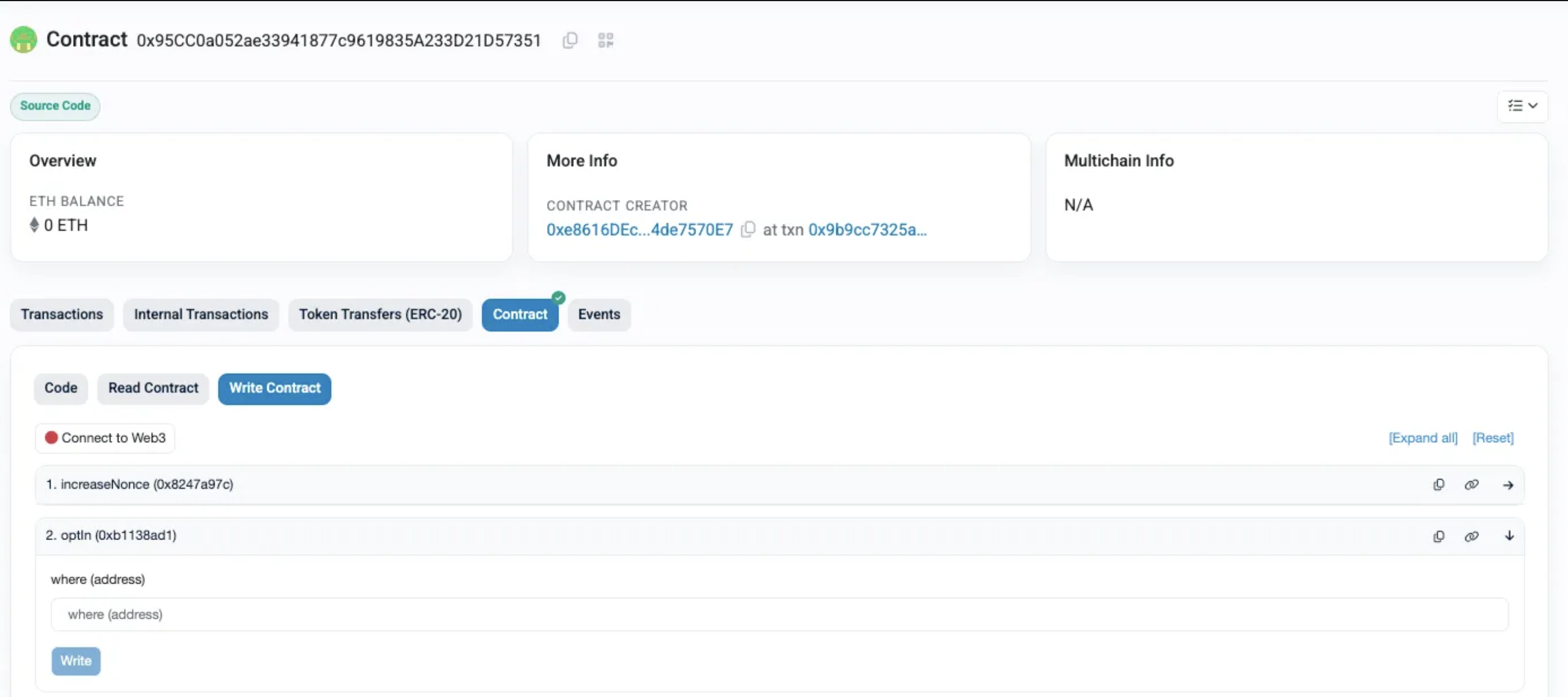
* Operator Opt-in for the [Vault](https://holesky.etherscan.io/address/0x95CC0a052ae33941877c9619835A233D21D57351#writeContract)

  <img className="hidden dark:block" src="https://mintcdn.com/capxai-642bf87b/o81eyv3KEzzQk7mM/images/Node-Testnet.png?fit=max&auto=format&n=o81eyv3KEzzQk7mM&q=85&s=d3db098339911c694f0c27168cffef17" alt="Node setup Testnet" about="Node setup Testnet" width="2728" height="1212" data-path="images/Node-Testnet.png" />

  <img className="block dark:hidden" src="https://mintcdn.com/capxai-642bf87b/o81eyv3KEzzQk7mM/images/Node-Testnet.png?fit=max&auto=format&n=o81eyv3KEzzQk7mM&q=85&s=d3db098339911c694f0c27168cffef17" alt="Node setup Testnet" about="Node setup Testnet" width="2728" height="1212" data-path="images/Node-Testnet.png" />

  * Contract - `0x95CC0a052ae33941877c9619835A233D21D57351`
  * Method - `optIn ( 0xb1138ad1)`
  * Params -
    * **where :** the vault contract address (`0x66a95b5981461D2BA23264d4d2fe20a85199a944`)
* First, the "approve" function should be called on the wstETH contract (address: `0x8d09a4502Cc8Cf1547aD300E066060D043f6982D`) with the following parameters:
  * **spender:** the vault contract address (`0x66a95b5981461D2BA23264d4d2fe20a85199a944`)
  * **amount:** `37000000000000000` (representing 0.037 ETH)
* The vault contract ( address : `0x66a95b5981461D2BA23264d4d2fe20a85199a944`) requires a deposit call with two parameters:
  * `onBehalfOf`: Operator address (or the address for which the deposit is made).
  * `amount`: The token amount in Wei. Based on the details above, the required parameter is `37000000000000000`.

## Wallet Configuration: Ledger/Safe vs. EOA

The appropriate environment file should be selected based on the wallet type being used.

<Tabs>
  <Tab title="Ledger/Safe Wallet">
    Two key parameters should be configured:

    * **`PRIVATE_KEY_ATTESTER` (Consensus Key):**

      This parameter holds the private key that is used for consensus-related operations. It is designated as the Consensus Key and is responsible for signing messages and attestations that participate in the consensus process.

    * **`OPERATOR_ADDRESS` (Controller Key Address):**

      This parameter holds the wallet address associated with the controller key. It is used to manage administrative functions and operator configurations. The separation of these keys helps enhance security by ensuring that the key used for consensus operations is distinct from the one controlling operator privileges.

    For further details on key roles and separation, please refer to the official documentation: [Othentic CLI Private Key Management](https://docs.othentic.xyz/main/avs-framework/othentic-cli/private-key-management#key-roles-and-separation)

    ```jsx theme={null}
    ##########################################################################################
    # Fill in your attestor's private key, and the RPC endpoints
    ##########################################################################################
    OPERATOR_ADDRESS=
    PRIVATE_KEY_ATTESTER=
    L1_RPC=https://ethereum-holesky-rpc.publicnode.com
    L2_RPC=https://ethereum-holesky-rpc.publicnode.com

    ##########################################################################################
    # Leave the following as they are
    ##########################################################################################
    OTHENTIC_REGISTRY_ADDRESS=0x41994741eD86Ec48e9578d0f64839E3F546466Fa
    AVS_GOVERNANCE_ADDRESS=0x476Ceb36F6f250297Bb59d45f00bdB053445E9CB
    ATTESTATION_CENTER_ADDRESS=0xd8caa8d58d6e3fB3CfD76D2ee7c982873c9Ce6e3
    IPFS_HOST=https://gateway.pinata.cloud/ipfs/
    OTHENTIC_BOOTSTRAP_ID=12D3KooWEaL5pGLey8qcEmapuAFZPNbgnDSULnSbbmbcTfbVLMTN
    OTHENTIC_BOOTSTRAP_SEED=49c6b501ba41f40d4bdbbe35cb0aaa7d304850ab199cca97dc9f7f016d47a9fb
    OTHENTIC_BOOTSTRAP_HOST=aggregator.services.capx.ai
    L1_CHAIN=17000
    L2_CHAIN=17000
    L1_CHAIN_CLI_CODE=holesky
    L2_CHAIN_CLI_CODE=holesky-l2
    ```
  </Tab>

  <Tab title="EOA Wallet">
    One Key parameters should be configured:

    * **`PRIVATE_KEY_ATTESTER` (Private Key):**

      This parameter holds the private key that is used for registering the operator.

    ```jsx theme={null}
    ##########################################################################################
    # Fill in your attestor's private key, and the RPC endpoints
    ##########################################################################################
    PRIVATE_KEY_ATTESTER=
    L1_RPC=https://ethereum-holesky-rpc.publicnode.com
    L2_RPC=https://ethereum-holesky-rpc.publicnode.com

    ##########################################################################################
    # OPTIONAL : Only Add this parameter if following Key Role separation. 
    ##########################################################################################
    OPERATOR_ADDRESS=

    ##########################################################################################
    # Leave the following as they are
    ##########################################################################################
    OTHENTIC_REGISTRY_ADDRESS=0x41994741eD86Ec48e9578d0f64839E3F546466Fa
    AVS_GOVERNANCE_ADDRESS=0x476Ceb36F6f250297Bb59d45f00bdB053445E9CB
    ATTESTATION_CENTER_ADDRESS=0xd8caa8d58d6e3fB3CfD76D2ee7c982873c9Ce6e3
    IPFS_HOST=https://gateway.pinata.cloud/ipfs/
    OTHENTIC_BOOTSTRAP_ID=12D3KooWEaL5pGLey8qcEmapuAFZPNbgnDSULnSbbmbcTfbVLMTN
    OTHENTIC_BOOTSTRAP_SEED=49c6b501ba41f40d4bdbbe35cb0aaa7d304850ab199cca97dc9f7f016d47a9fb
    OTHENTIC_BOOTSTRAP_HOST=aggregator.services.capx.ai
    L1_CHAIN=17000
    L2_CHAIN=17000
    L1_CHAIN_CLI_CODE=holesky
    L2_CHAIN_CLI_CODE=holesky-l2
    ```
  </Tab>
</Tabs>

***

## Operator ( Attestor Node ) Setup

<Warning>
  This is an early development release (v0.1.0) intended for testing and network growth. Operators should be aware that future updates may include breaking changes as the network evolves.
</Warning>

### Key Features

* Basic P2P attestation node implementation
* Network discovery and peer connection
* Integration with Symbiotic protocol security layer
* Attestation service foundations
* Minimal operator configuration requirements

## Docker Images

### Attester P2P Node (Testnet)

```
Image: capxcloud/attester-p2p-node-testnet:0.1.0
SHA256: be4144a571b65f8066ed48875f69032a2014735a825061080959a872dd5e670d
```

### Validation Service (Testnet)

```bash theme={null}
Image: capxcloud/validation-service-testnet:0.1.0
SHA256: f545ba82b27b6e80dd1063e94ca5b07754268446a80e42e007e2bfb78900647c
```

## Docker Compose file

```docker theme={null}
name: capxcloud-attestation-system-test

services:
  attester-p2p-node:
    image: capxcloud/attester-p2p-node-testnet:latest
    container_name: attester-p2p-node
    restart: unless-stopped
    command: ["/usr/local/bin/start-attester.sh"]
    env_file:
      - path: .env
        required: true
    environment:
      - OTHENTIC_BOOTSTRAP_HOST=${OTHENTIC_BOOTSTRAP_HOST}
      - PRIVATE_KEY=${PRIVATE_KEY_ATTESTER}
      - TASK_PERFORMER=0x0000000000000000000000000000000000000000
      - OTHENTIC_BOOTSTRAP_ID=${OTHENTIC_BOOTSTRAP_ID}
      - L1_CHAIN_CLI_CODE=${L1_CHAIN_CLI_CODE}
      - L2_CHAIN_CLI_CODE=${L2_CHAIN_CLI_CODE}
      - L1_RPC=${L1_RPC}
      - L2_RPC=${L2_RPC}
      - VALIDATION_SERVICE_IP=10.2.0.42
    networks:
      p2p-test:
        ipv4_address: 10.2.0.2
    depends_on:
      validation-service:
        condition: service_healthy
    deploy:
      resources:
        limits:
          cpus: "1"
          memory: 1G
        reservations:
          cpus: "0.25"
          memory: 512M
    healthcheck:
      test: ["CMD", "/usr/local/bin/health-check.sh"]
      interval: 30s
      timeout: 10s
      retries: 1
      start_period: 60s
      start_interval: 30s
    logging:
      driver: "json-file"
      options:
        max-size: "50m"
        max-file: "7"
        compress: "true"

  validation-service:
    image: capxcloud/validation-service-testnet:latest
    container_name: validation-service
    env_file:
      - .env
    networks:
      p2p-test:
        ipv4_address: 10.2.0.42
    restart: unless-stopped
    deploy:
      resources:
        limits:
          cpus: "1"
          memory: 1G
        reservations:
          cpus: "0.25"
          memory: 512M
    healthcheck:
      test: ["CMD", "curl", "-f", "http://localhost:4002/health"]
      interval: 30s
      timeout: 10s
      retries: 3
      start_period: 40s
    logging:
      driver: "json-file"
      options:
        max-size: "50m"
        max-file: "7"
        compress: "true"

networks:
  p2p-test:
    driver: bridge
    ipam:
      config:
        - subnet: 10.2.0.0/16
          gateway: 10.2.0.1
```

### Instructions for Running the Setup

1. **Prerequisites:**
   * It is expected that Docker and Docker Compose are installed.
   * Ensure that the required environment variables are configured either in a `.env` file or in your shell environment.
2. **Deploying the Services:**
   * Navigate to the directory containing the Docker Compose file.

   * Execute the following command to start the services in detached mode:

     ```bash theme={null}
     docker-compose up -d
     ```

   * The services will be initiated in the background.
3. **Monitoring Logs:**
   * To monitor the logs for all services in real time, it is advised to use:

     ```bash theme={null}
     docker-compose logs -f
     ```

   * This command will stream the logs continuously, allowing for live troubleshooting.
4. **Managing the Deployment:**
   * To stop the services, the following command can be used:

     ```bash theme={null}
     docker-compose down
     ```

   * If an update of the images is needed, it is recommended to run:

     ```bash theme={null}
     docker-compose pull && docker-compose up -d
     ```
